Sharing Your Maps Just Got a Lot Easier
When we launched Moving Polygons, every published map already got its own shareable URL. That was a solid start — but we kept hearing the same two requests. First: "Can I download this as a GIF so I can share it on social media or in a presentation?" And second: "Can I put this interactive map directly on my own website?" Today, we're happy to announce that both are now possible.
Export as GIF
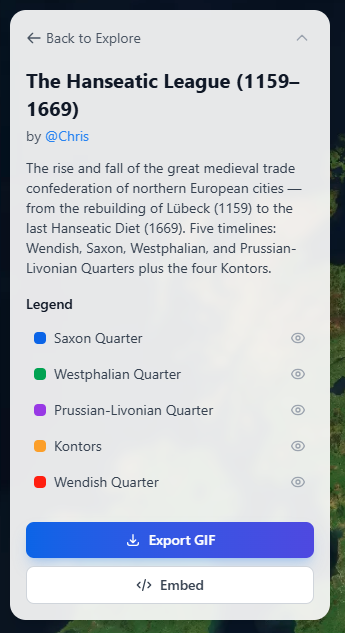
Any published map on Moving Polygons can now be exported as an animated GIF. Open a published map, and you'll find the "Export GIF" button in the side panel. Click it, and the system will automatically play through the entire animation, capturing 30 frames along the way. You'll see a progress indicator while it works — frame capture takes roughly the first half, and encoding the GIF takes the second half.
Each frame is captured directly from the map canvas at full resolution, quantized down to 256 colors (the GIF standard), and assembled into a smoothly looping animation. The frame timing respects your current playback speed, so if you've set the map to play at 2x speed, the exported GIF will reflect that pace. A small "Made with movingpolygons.com" watermark is included in the bottom-right corner of the GIF.
Once encoding is complete, the GIF downloads automatically to your computer with a filename based on your map's title. From there, you can share it anywhere — drop it into a presentation, post it on social media, attach it to an email, or include it in a blog post. It's a great way to give people a quick preview of what your animated map looks like, without requiring them to visit the site.
Embed Interactive Maps
While a GIF captures the animation, it's still a static file — viewers can't pause, scrub through the timeline, or interact with the map. That's where embedding comes in. Every published map on Moving Polygons now comes with an embed code that lets you place a fully interactive version of the map on any website.
On the public map page, click the "Embed" button in the side panel. This reveals a ready-to-use HTML snippet — a simple iframe tag that you can copy and paste into your website, blog, CMS, or any platform that supports HTML embeds. The default dimensions are 800 by 600 pixels, but you can adjust the width and height to fit your layout.
The embedded version is designed to be clean and self-contained. It automatically starts playing the animation in a loop as soon as it loads. Viewers get compact timeline controls at the bottom — play/pause, loop toggle, speed adjustment, and a seekable progress bar — but without the full navigation chrome of the main site. This keeps the focus entirely on the map itself.
Domain Whitelisting
If you want to control where your map can be embedded, you can configure a domain whitelist in your map settings. When no domains are specified, the map can be embedded anywhere. If you add specific domains — for example, "myblog.com" or "university.edu" — the embed will only load on those sites. Subdomain matching is supported, so adding "example.com" will also allow "blog.example.com". This gives you full control over where your interactive maps appear.
When to Use Which
Use GIF export when you need a portable, universally compatible file — presentations, social media posts, messaging apps, or anywhere that doesn't support HTML embeds. Use the embed code when you want to give your audience the full interactive experience on your own site, complete with playback controls and the ability to explore the map at their own pace.
Both features are available to all users during our beta period. We're excited to see how the community uses them. If you create something interesting with either feature, we'd love to hear about it — reach out through our contact page or share it on social media.